Showing 61–80 of 91 resultsSorted by price: low to high
-

$9.99
Editable PSD flyer template for Movember campaigns that includes a separate Facebook cover PSD; organised, color-coded layers with smart-object main image replacement and pre-installed color option groups. Uses free fonts Abril Fatface and Chunk Five and includes master adjustment layers for contrast and color balance.
-

$9.99
Layered PSD flyer template with a neon-style design named ‘neon madness’, delivered with editable smart-object placeholders, multiple color option groups and a separate Facebook cover PSD. Readme lists the free fonts used and explains master adjustment layers and print-ready bleed setup for easy customization.
-
$9.99
Layered ‘neon’ flyer PSD package with a full-size print-ready file (with bleed) plus a Facebook-optimized PSD; includes editable smart-object main image, preinstalled color option groups, adjustment layers and free-font usage instructions.
-

$9.99
Editable layered PSD flyer template for nightclub and party promotions with smart-object image replacement, master adjustment layers and multiple pre-installed color options; includes a Facebook preview file. Layers are color-coded and named for easy customization.
-
$9.99
A Photoshop template pack containing a flyer PSD and a Facebook cover PSD; includes a PDF readme listing required fonts. Suited for print and social-media promotional materials.
-

$9.99
Layered, print-ready PSD flyer template for promoting Thursday or weekly events; includes a smart-object main image (blurred placeholder), master adjustment layers and pre-installed color option groups. File is organized with color-coded groups and a readme listing the free fonts used.
-

$9.99
Layered, print-ready promotional flyer PSD with Smart Object image placeholder, master adjustment layers and multiple pre-installed color option groups; includes a Facebook preview PSD and uses the free SF UI Display font. Layers are color-coded and named for easy editing of images, text, colors and contrast.
-

$9.99
Print-ready, layered PSD flyer template for promotional events; includes editable image placeholder (blurred image referenced), master adjustment layers and multiple pre-installed color option groups. Four free fonts are listed in the readme and the PSD is organized with color-coded groups and named layers for easy editing.
-

$9.99
Layered PSD flyer template with pull-off tear tabs and editable smart-object image; includes a matching Facebook cover PSD and pre-installed color option groups. Uses free fonts ChunkFive and Open Sans and features organized, color-coded layers and master adjustment controls for easy customization.
-

$6.99
A Photoshop action package (labelled ‘Red Selection’) that works via a Smart Object PSD to automate a red-focused selection or color-emphasis workflow; requires RGB, 8‑bit images and the English version of Photoshop. Archive includes a Red Selection.psd and a Readme with usage steps.
-

$9.99
Layered PSD flyer template for promoting rock/party music events; includes editable smart-object main image, master adjustment layers, multiple pre-installed color options and clear instructions, and is set up with bleed for print.
-

$9.99
Layered, print-ready PSD flyer template for sale and promotional events with editable smart-object image placeholders, pre-installed color option groups and master adjustment layers; uses Arial and Myriad Pro and includes document bleed settings.
-

$9.99
A layered PSD flyer template titled for ‘Sale’ promotions, including a main flyer PSD and a Facebook preview PSD for social-post use. Designed as an editable starting layout for retail and promotional marketing.
-

$9.99
Layered PSD flyer template for seasonal sales and promotions with an editable smart-object main image, pre-installed color option groups and master adjustment layers; readme lists free fonts and basic editing instructions.
-

$9.99
Layered PSD flyer template for seasonal sale promotions with editable text, smart-object image placeholder and multiple pre-installed color option groups; a separate Facebook preview PSD is included and free fonts SF UI Display and Zaio are specified in the readme.
-

$9.99
Editable layered PSD flyer template for seasonal sales and promotions; includes smart-object main image, color-adjustment groups and a Facebook preview PSD for social use.
-

$9.99
Layered PSD template that uses a Smart Object to produce a selective-area (color pop) effect; replace your photo into the Smart Object and save. Readme notes require RGB 8‑bit images and the English version of Photoshop.
-
$9.99
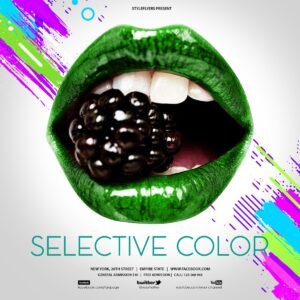
A layered Photoshop (PSD) template for animated Instagram posts that implements a selective-color (color-pop) effect. Includes an editable PSD intended for use as an animated social post with photo and text placeholders.
-

$9.99
A Photoshop (PSD) template for creating animated Instagram content that uses a selective-color (color-splash) effect. Delivered as a layered PSD so you can open in Photoshop, edit layers/smart objects and export animation for social sharing.
-

$6.99
A Photoshop action that produces sign-style/illuminated lighting effects using an included Smart Object PSD. Requires RGB, 8‑bit images and the English version of Photoshop; paste your photo into the Smart Object and save to apply.