
Cartoon PS Action
$6.99Photoshop action that turns photographs—especially portraits—into cartoon/comic-style illustrations with bold ink outlines and posterized color areas, useful for posters, social imagery and editorial art.
Showing 101–120 of 556 resultsSorted by price: low to high
Photoshop action that turns photographs—especially portraits—into cartoon/comic-style illustrations with bold ink outlines and posterized color areas, useful for posters, social imagery and editorial art.

Photoshop action + PSD that converts photos into a sharpened-edge cartoon painting with bold ink outlines and painterly texture; uses a Smart Object — open the Smart Object, paste your photo and save.
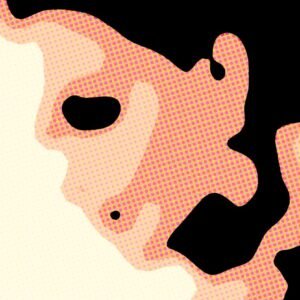
A Photoshop action that converts photos into cartoon/vector-style portraits with halftone dots, posterized shading and ink outlines; requires RGB 8-bit images and a Smart Object workflow as noted in the Readme.

Photoshop Cartoonize action packaged as a layered PSD that uses a Smart Object workflow to turn portrait photos into a stylized cartoon/painted illustration; requires RGB, 8‑bit and English-version Photoshop (instructions included in Readme).
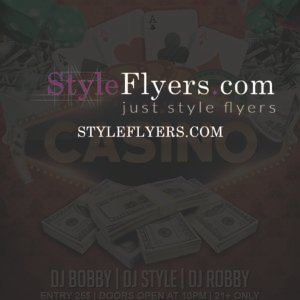
A layered, print-ready Photoshop flyer template for casino and club promotions; includes an editable smart-object image placeholder, color/contrast adjustment groups, multiple pre-installed color options and a Facebook cover PSD variant. Readme lists free fonts (Primetime, Bira, Big Noodle Titling) and notes organized, color-coded groups for easy editing.

Editable PSD flyer template for casino-themed promotions; archive includes a full-size PSD and a Facebook preview PSD for social placement.
Photoshop action-style product supplied as a PSD that converts photos into a white-on-black chalk-drawing / chalkboard portrait with speckled grain. Replace the Smart Object with your photo (RGB, 8-bit, English Photoshop) and save to apply the effect.

Square animated PSD template for promoting championships and sports events, featuring a trophy, soccer ball, confetti and bold headline text for Instagram/Facebook/Twitter posts. Includes a layered PSD and a readme PDF in the archive.

Layered, print-oriented PSD flyer template titled “championship” for promoting tournaments or competitive events; includes smart-object image placeholder, master adjustment layers and multiple color option groups and uses the Impact font. The PSD is organized with color-coded groups and includes a preview.psd and bleed setting noted in the readme.

Layered PSD party flyer template with editable text, a blurred-image Smart Object placeholder, master adjustment and multiple color option groups; includes a matching Facebook cover PSD. Well-organized layers and instructions for swapping images and changing colors are provided in the readme.

Layered, print-ready Photoshop flyer template titled “Chilly Chile” with organized, color-coded groups, an editable main image placeholder and multiple pre-installed color options; uses Myriad Pro as the provided font. Includes master adjustment layers for contrast and color balance and is set up with bleed for print output.

A Photoshop action named ‘Chroma Art’ that applies a chromatic/artistic color effect; workflow requires opening the included PSD Smart Object, pasting your RGB 8‑bit photo into it, and saving. The readme specifies an English-version Photoshop and Smart Object workflow.

A Photoshop PSD text-effect template that applies a chrome, light-reflective finish to editable text via a Smart Object—open the PSD, edit the Smart Object text and save to update the effect.

Editable Photoshop PSD that uses a Smart Object for instantly applying a chrome/metallic look to your text — open the Smart Object, replace text, save to update the effect.

Layered Photoshop PSD that applies a chrome/metallic textured treatment to text via a Smart Object; replace the sample text in the Smart Object and save to update the effect. Includes a preview showing a bold gold/chrome headline on a dark textured background.

Layered PSD flyer template titled “city sound” for promoting music/club events; editable Smart Object for the main image, pre-made color option groups and master adjustment layers make recoloring and customization easy. Includes two PSD files (main and Facebook preview) and lists Nexa Bold and SF UI Display as free fonts used.

Layered Photoshop flyer template for club and party promotions; archive includes a separate Facebook-preview PSD. Designed as an editable PSD with placeholders for event headlines and details.

Editable PSD flyer template titled ‘Club Party’ for promoting club and party events; archive includes the main PSD and a Facebook-preview PSD. Supplied as Photoshop files for customization.

Editable layered PSD template for club and party promotion; includes organized, color-coded groups, master adjustment layers and pre-installed color option groups, plus a Facebook-sized preview PSD. Fonts used are Ohmega Sans and SF UI Display; main image is a Smart Object (replaceable blurred photo) and the file is set up with a 0.25 bleed for print.

Photoshop PSD action that converts RGB 8‑bit photos into a colored circular-dot (halftone) portrait using a Smart Object; open the Smart Object, paste your photo and save to apply the effect. Ideal for posters, social graphics and retro/pop‑art styling.
Notifications