
Spray Paint Text Effect
$9.99Layered Photoshop PSD text effect using a Smart Object to create a white spray-paint / grunge stencil look on a dark textured background; open the Smart Object, replace the text and save to apply the effect.
Showing 61–70 of 70 resultsSorted by price: low to high

Layered Photoshop PSD text effect using a Smart Object to create a white spray-paint / grunge stencil look on a dark textured background; open the Smart Object, replace the text and save to apply the effect.

Photoshop action that applies a storm/dispersion (shatter) particle effect using a Smart Object workflow; requires RGB, 8‑bit images and the English version of Photoshop. Archive includes a layered PSD (Smart Object) sample and a README with usage notes.

Layered Photoshop PSD with editable smart-object text that applies a realistic fire/flame effect; open in Adobe Photoshop, edit the smart object text and save to update the effect.

Photoshop action packaged with a PSD Smart Object that produces a TV-style glitch/distortion effect; requires Photoshop (English) CS4/CS5/CS6/CC+ and an RGB 8‑bit image. Open the Smart Object, paste your photo, save to apply the effect.

PSD Photoshop action that applies a vintage/retro look to photos via a Smart Object; requires Photoshop (English), RGB color mode and 8‑bit images — open the Smart Object, paste your photo and save. The preview shows film scratches, grain and faded warm/cool colour casts.

Photoshop action that applies a vintage film-style treatment (grain, scratches, sepia/green cast and vignette) using a Smart Object workflow; requires Photoshop (English) and RGB 8-bit images. Archive includes a PSD sample/Smart Object.
Photoshop action that turns photos into watercolor-style portraits with splatter and ink-grunge textures; includes a PSD and requires placing your image into the supplied Smart Object. Requires Photoshop (English), RGB color mode, 8‑bit.

A Photoshop ‘Zombie Text’ effect provided as a layered PSD with a Smart Object — open the smart object, replace the text and save to apply the effect. Intended for quickly producing zombie/horror-style headlines and titles.
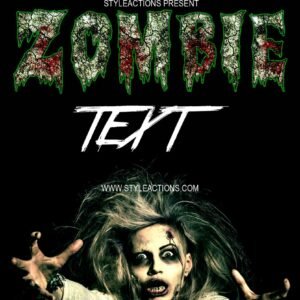
‘Zombie Text Photoshop Action’ is packaged with a layered PSD that uses a Smart Object for editable text—open the Smart Object, paste your text and save to apply the zombie-style effect; a Readme (TXT) includes basic instructions. Although listed as an action, the archive contains a PSD and usage steps rather than a separate .atn file.

Photoshop action package advertised to produce a cartoon-style scary/horror text effect; includes a layered Smart-Object PSD where you paste your text and save to apply the effect. Suitable for Halloween posters, comic-style headlines and bold promotional titles.
Notifications